4x8 Assembly Table
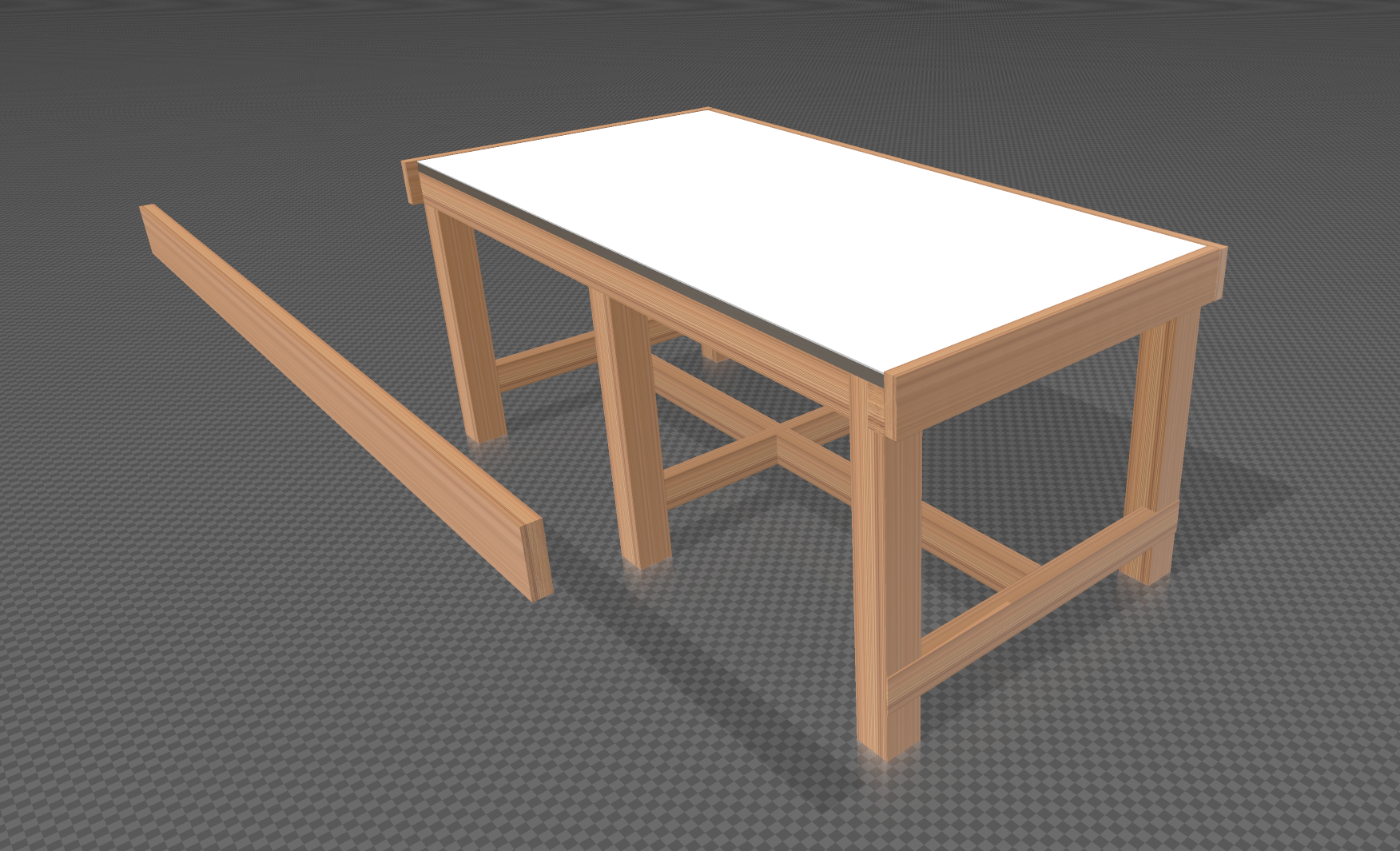 3D Model
My shop needs a large assembly table that can accommodate a large piece of furniture, a museum-scale ship model, or serve as an outfeed table for one of my saws. This table will live in 2-car garage and sit next to my 16’ miter station and benchwork.
Lumber:
- 2x4 12-footers milled down to 3"
- Two 4x8 3/4" MDF sheets
- 4x8 White Dry-Erase Hardboard Sheet
- 1x4 8’ clear pine boards
Paragraphs and Headings
Just type for a paragraph. Leave a blank line between paragraphs.
## Section heading

### Sub-heading

#### Smaller sub-heading
This is an H2 section heading
This is an H3 sub-heading
This is an H4
Text Formatting
**Bold text**
*Italic text*
~~Strikethrough~~
`Inline code`
Bold text — good for emphasis on key terms.
Italic text — good for titles, foreign words, or gentle emphasis.
Strikethrough — good for corrections or crossed-out items.
Inline code — good for file names, commands, or technical terms.
Links
[Link text](https://example.com)
[Opens in new tab](https://example.com){target="_blank" rel="noopener"}
Visit billweckel.com — opens in same tab. Visit billweckel.com{target="_blank" rel=“noopener”} — opens in new tab.
Images
Drop your image file into the same folder as your index.md, then reference it by filename only:

*Optional italic caption on the next line*
To use an image from the site-wide /images/ folder:

Tips:
- Always write meaningful alt text — it helps with accessibility and SEO
- Captions are optional; wrap in
*asterisks*for italic styling - JPG for photos, PNG for graphics with transparency
Lists
- First item
- Second item
- Third item

1. First step
2. Second step
3. Third step
Unordered list:
- Wildlife photography works best in the golden hour — the hour after sunrise and before sunset
- Shoot in RAW format whenever possible for maximum editing flexibility
- A monopod is often more practical than a tripod in the field
Numbered list:
- Import your RAW files into Lightroom
- Apply your base exposure corrections
- Export as TIFF before opening in Photoshop
Blockquote
> Your quoted text here. Good for pulling out a key idea or attributing a quote.
The best camera is the one you have with you. Keep your eye trained, your settings ready, and your battery charged.
Horizontal Rule
Use three dashes on their own line to add a visual divider between sections:
---
Pullquote Shortcode
Use for a visually styled pull quote with a left border. Good for breaking up long posts.
{{< pullquote >}}
Your pullquote text here.
{{< /pullquote >}}
Working example:
Post-processing is not cheating — it is the digital darkroom, and it has always been part of the photographic craft.
Button Shortcode
Use for calls to action — links to galleries, external resources, or related posts.
{{< button url="/portfolio/photography/wildlife/" text="View Wildlife Gallery" >}}
{{< button url="https://example.com" text="External Link" target="_blank" >}}
Working examples:
View Wildlife Gallery View Commercial Gallery
Mini Gallery Shortcode
Displays a 3-column grid with lightbox. All images must be in the same folder as the post.
{{< postgallery images="photo1.jpg, photo2.jpg, photo3.jpg" >}}Tips:
- Separate filenames with commas
- Add as many images as you like — the grid wraps automatically
- Click any image to open the lightbox
Image Slider Shortcode
A before/after reveal slider. Drag the handle to reveal. Both images must be in the same folder as the post, or use absolute paths from the site root.
{{< imageslider before="before.jpg" after="after.jpg" >}}

{{< imageslider before="before.jpg" after="after.jpg" beforelabel="SOOC" afterlabel="Edited" >}}
Tips:
- Labels are optional — omit for default “Before / After”
- Images should be the same aspect ratio for best results
- Works with touch on mobile
Working example:
Creating a New Post
- In VS Code, go to
content/blog/ - Create a new folder using lowercase with hyphens e.g.
my-post-title - Inside that folder create
index.md - Start with the frontmatter block from the top of this page
- Drop any images for this post into the same folder
- When ready to publish:
git add . && git commit -m "New post: title" && git push